EJB – pt1

All

EJB

EJB is deployed in Jar, War, Ear format. In WAR, if the EJB is packaged in jar format, it can be placed in WEB-INF/lib. If EJB classes are to be directly packaged in WAR, they can placed in WEB-INF/classes.

I will create a minimal project here to show a client accessing a Stateless bean (basically a simplified version from quickstart) and code on Github.

1. Create the project:

For this you need a home interface/remote interface and the implementation, as explained here:

1.a Create an interface

import javax.ejb.Remote;
@Remote
public interface SumRemote
{ int add(int a, int b); }

1.b Implement this interface

import javax.ejb.Stateless;

@Stateless
public class Sum implements SumRemote
{ public int add(int a, int b){ return a+b; } }

1.c Create a client (eap 7.1:)

Get the InitialContext:

public static Context getInitialContext() throws NamingException{
Properties props = new Properties();
props.put(Context.INITIAL_CONTEXT_FACTORY, “org.wildfly.naming.client.WildFlyInitialContextFactory”);
props.put(Context.PROVIDER_URL,”remote+http://localhost:8080“);
final Context context = new InitialContext(props);
return context;

(The port here comes from <socket-binding name=”http” port=”${jboss.http.port:8080}”/>)

And then get the remote – attention that is stateless so the JNDI will be:

The class name we know, is SumRemote, so we can add it diretly, or use the .class.getName(0;

SumRemote remote = (SumRemote) getInitialContext().lookup(“ejb:/EjbSum/Sum!” + SumRemote.class.getName());

OR

AdderImplRemote remote = (AdderImplRemote) getInitialContext().lookup(“ejb:/EjbRemote/Sum!SumRemote”);

2. Export

JBOSS_HOME/modules/system/layers/base/javax/ejb/api/main/jboss-ejb-api_3.2_spec-1.0.1.Final-redhat-1.jar

3. Compile and package:

[fdemeloj@fdemeloj Bean]$ javac Sum*

[fdemeloj@fdemeloj Bean]$ jar -cvf EjbSum.jar .
added manifest
adding: SumRemote.class(in = 194) (out= 163)(deflated 15%)
adding: Sum.class(in = 335) (out= 253)(deflated 24%)

Compile the Client

#export CLASSPATH=/home/fdemeloj/jboss-eap-7.3/bin/client/jboss-client.jar:$CLASSPATH
#javac StandaloneClient.java

4.Deploy

[fdemeloj@fdemeloj Bean]$ cp EjbSum.jar $JBOSS_HOME/standalone/deployments

This is the JNDI:

23:17:47,545 INFO [org.jboss.as.ejb3.deployment] (MSC service thread 1-1) WFLYEJB0473: JNDI bindings for session bean named ‘Sum’ in deployment unit ‘deployment “EjbSum.jar”‘ are as follows:

java:global/EjbSum/Sum!SumRemote
java:app/EjbSum/Sum!SumRemote
java:module/Sum!SumRemote
java:jboss/exported/EjbSum/Sum!SumRemote
ejb:/EjbSum/Sum!SumRemote
java:global/EjbSum/Sum
java:app/EjbSum/Sum
java:module/Sum

5. Test

# java StandaloneClient
Getting the Remote
Apr 19, 2020 2:05:10 AM org.wildfly.naming.client.Version <clinit>
INFO: WildFly Naming version 1.0.11.Final-redhat-00001
Apr 19, 2020 2:05:10 AM org.wildfly.security.Version <clinit>
INFO: ELY00001: WildFly Elytron version 1.10.4.Final-redhat-00001
Apr 19, 2020 2:05:10 AM org.xnio.Xnio <clinit>
INFO: XNIO version 3.7.7.Final-redhat-00001
Apr 19, 2020 2:05:10 AM org.xnio.nio.NioXnio <clinit>
INFO: XNIO NIO Implementation Version 3.7.7.Final-redhat-00001
Apr 19, 2020 2:05:10 AM org.jboss.threads.Version <clinit>
INFO: JBoss Threads version 2.3.3.Final-redhat-00001
Apr 19, 2020 2:05:10 AM org.jboss.remoting3.EndpointImpl <clinit>
INFO: JBoss Remoting version 5.0.16.Final-redhat-00001
Apr 19, 2020 2:05:10 AM org.jboss.ejb.client.EJBClient <clinit>
INFO: JBoss EJB Client version 4.0.27.Final-redhat-00001
Got the remote InterfaceProxy for remote EJB StatelessEJBLocator for “/EjbSum/Sum”, view is interface SumRemote, affinity is None
20

The 20 is the answer.

5. Comparing Remote vs Local

When Same deploying in the same JVM use local and when using another JVM use remote:

@Local ~

Call by Reference, the overhead is minimal, since it is the same JVM so the parameters is the same, so the references are the same. As results, no overhead.

@Remote ~

Call by Value, processing overhead, since are different JVM, the location is remote, the parameters will be value. Remote method invocation: marshed parameters then.
There is a overhead, because of the marsheling. So no references, but a copy of the value.

@Local annotated beans can only be accessed if they are in the same application.

@Remote annotated beans can be accessed across different applications, residing in different jvms or across application servers.

As pointed here

6. JNDI Reference

ejb:<app>/<moduleName>/<distinctName>/<beanName>!<viewClassName>?stateful
<app>EAR name
<moduleName> name of EJB jar
<distinctName> Optional Name
<beanName> Bean’s class
<ViewClassName> fully qualified class name of the remote interface

7. To extract content from jar file:

jar xf jar-file [archived-file(s)]

8. Get the Environment from the context, it will return what is passed:

System.out.println(context.getEnvironment());

Returns:

{java.naming.factory.initial=org.wildfly.naming.client.WildFlyInitialContextFactory, java.naming.provider.url=remote+http://localhost:8080}

8. References:

For JBoss EAP 7.1:

Coding EJB clients for JBoss EAP 7.1

Infinispan/JDG Quickstarts Pt4 – HotRod

All

Intro

This tutorial I have been a long time thinking about doing. This will come in handy: Rod Hot Client Guide

Before start

Download and install the client and install it:

npm install /path/to/jboss-datagrid-7.0.0-nodejs-client/infinispan-0.2.0.Final-redhat-1.tgz

It will also require vorpal js lib =|===>

Deploying

[fdemeloj@fdemeloj hotrod-endpoint-js]$ node football-manager.js
football-manager >

Core

As the guide mentions, the main part is done after the connection, then the functions are added after, but they use vorpal – bsically all in football-manager.js:

   var infinispan = require(‘infinispan’);
var vorpal = require(‘vorpal’)();

infinispan.client({port: 11222, host: ‘127.0.0.1’}).then(function(client)

Commands in Vorpal:

vorpal
.command(‘at [teamName]’, ‘Add a team.’)
.action(addTeam(client));

addPlayer:

function addPlayer(client) {
return function(args, callback) {
var teamName = args.teamName;
var playerName = args.playerName;

var getTeam = client.get(teamName);
var putPlayer = getTeam.then(function(t) {
return client.put(teamName, appendPlayer(t, playerName));
});

return putPlayer.then(callback);

Printing value with `​p`

football-manager > at “Holand”
Add Team
true

football-manager > p
Add Team
=== Team: Holand ===

Interesting facts

  1. If you do ​`tree command` the list of files is huge, cause all the js scripts from the libs are there, apparently.
  2. Deploying in version JDG 7.2 gives an exception, but version JDG 7.3 works perfectly.
    1. ERROR [org.infinispan.server.hotrod.CacheDecodeContext]ISPN005003: Exception reported: org.infinispan.server.hotrod.InvalidMagicIdException: Error reading magic byte or message id: 13 at org.infinispan.server.hotrod.HotRodDecoder.readHeader(HotRodDecoder.java:184)
  3. Using vorpal makes the example pretty easy, with help and everything – tutorial here
  4. The package.json` has the dependencies and others info about the project
  5. `hotrod-client.properties` is not used.

Infinispan/JDG Quickstarts Pt3 – Hello World

All

Intro

This was suppose to be the first part, but ended up being the third. I should have showed this presentation as well, by Kylin Soon.

Deployment

The tests are failing for now, so let’s skip them.

[fdemeloj@fdemeloj target]$ mvn clean install -Dmaven.test.skip=true

Same approach copy to /standalone/deployments

INFO [org.jboss.as.server] (DeploymentScanner-threads – 1) WFLYSRV0010: Deployed “jboss-helloworld-jdg.war” (runtime-name : “jboss-helloworld-jdg.war”)

Core Part

Well, as expected the core part is the cache, which has the following configurations:

public DefaultCacheManager getCacheManager() {
if (manager == null) {

GlobalConfiguration glob = new GlobalConfigurationBuilder().clusteredDefault() // Builds a default clustered
.transport().addProperty(“configurationFile”, “jgroups-udp.xml”)
.globalJmxStatistics().allowDuplicateDomains(true).enable()
.build();
Configuration loc = new ConfigurationBuilder().jmxStatistics().enable() // Enable JMX statistics
.clustering().cacheMode(CacheMode.DIST_SYNC) /
.hash().numOwners(2)
.expiration().lifespan(ENTRY_LIFESPAN)
.build();
manager = new DefaultCacheManager(glob, loc, true);
}

Meaning

.expiration().lifespan(ENTRY_LIFESPAN) time to expire the data in the cache.

Lifespan property is pretty cool

jgroups-udp.xml

Differently than the other three, this one uses a specific jdg configuration file that set’s multicast – UDP properties, instead of TCP. Some recommendations for this file here.


<UDP
bind_addr=”${jgroups.bind_addr:127.0.0.1}”
mcast_addr=”${jgroups.udp.mcast_addr:228.6.7.8}”
mcast_port=”${jgroups.udp.mcast_port:46655}”
tos=”8″
ucast_recv_buf_size=”20000000″
ucast_send_buf_size=”640000″
mcast_recv_buf_size=”25000000″
mcast_send_buf_size=”640000″
max_bundle_size=”64000″
ip_ttl=”${jgroups.udp.ip_ttl:2}”
enable_diagnostics=”false”

thread_naming_pattern=”pl”

thread_pool.enabled=”true”
thread_pool.min_threads=”2″
thread_pool.max_threads=”30″
thread_pool.keep_alive_time=”5000″
/>

<PING />
<MERGE3 max_interval=”30000″ min_interval=”10000″/>
<FD_SOCK/>
<FD_ALL/>
<BARRIER />
<pbcast.NAKACK2 use_mcast_xmit=”true” discard_delivered_msgs=”true”/>
<UNICAST3/>
<pbcast.STABLE stability_delay=”1000″ desired_avg_gossip=”50000″ max_bytes=”1000000″/>
<pbcast.GMS print_local_addr=”false” join_timeout=”3000″ view_bundling=”true”/>
<UFC max_credits=”500000″ min_threshold=”0.20″/>
<MFC max_credits=”500000″ min_threshold=”0.20″/>
<FRAG2 frag_size=”60000″ />

Adding value

Pretty much standard, as before, get the (default) cache manager and put the value.

  INFO [org.jboss.as.quickstarts.datagrid.helloworld.PutController] (default task-1) put: jdg 8

Interesting parts

  1. The Security Manager
  2. double lines when creating the default cache manager and the configuration file
  3. Lifespan and UDP were the best part

Cache Management

All

CacheManager is vital for cache management, acting as a container for caches and controls their lifecycle, managing global configuration and common data structures.

But not just this, other resources (for example thread pools) and finally, it manages the cluster.

Considering this, there are possibly three scenarios when using CacheManager RHDG (library mode) feature:

I will explain a possible scenario: one CacheManager per JVM.

org.infinispan.manager.DefaultCacheManager;
CacheManager manager = CacheManager.getInstance("my-config-file.xml");
Cache<String, Person> entityCache = manager.getCache("myEntityCache");
entityCache.put("aPerson", new Person());

ConfigurationBuilder confBuilder = new ConfigurationBuilder();
confBuilder.clustering().cacheMode(CacheMode.REPL_SYNC);
manager.createCache("myReplicatedCache", confBuilder.build());
Cache<String, String> replicatedCache = manager.getCache("myReplicatedCache");

In this scenario one creates the cache manager using themy-config-file.xml configuration file, gets the cache and sets up the mode and creates a another cache.

References for cachemanager configuration

CacheManager that spawn the caches, are very heavy some documentation bring that only one should be used per JVM.

The other ones ( Separate CacheManager) I will leave for later, but this can be spotted seen on the logs as:

[timestamp] INFO [org.infinispan.CLUSTER] (jgroups-n,exampleNode) ISPN100000: Node exampleNode joined the cluster
[timestamp] INFO [org.infinispan.CLUSTER] (jgroups-m,example) ISPN100000: Node exampleNode joined the cluster

Interestingly, for JMX it is possible to use it with multiple CacheManager, except one needs to enable it:

new GlobalConfigurationBuilder().globalJmxStatistics().allowDuplicateDomains(true)

But it is also wise to set a different domain, as explained on this StackOverflow question.

new GlobalConfigurationBuilder().globalJmxStatistics().jmxDomain("domain")


Infinispan/JDG Quickstarts Pt2 – CarMart-Tx

All

Intro

Continuing the topic on jdg quick-starts, the next would be CarMart-tx, so a bit of transactions on the game. As before, I would recommend to read the configuration with the latest User Guide in another tab.

What is different than CarMart

Pretty much everything similar to CarMart, however, now with the TX part.

First difference will be:

.jmxDomain(“org.infinispan.carmart.tx”)
.defaultCacheName(“default”)


The first line pretty much give a jmxDomain so it won’t colide with the other tutorial carMart. The second, actually give a name to the cache.

And of course, the core difference, in the cache configuration:

.transaction().transactionMode(TransactionMode.TRANSACTIONAL).autoCommit(false)

.lockingMode(LockingMode.OPTIMISTIC).transactionManagerLookup(new GenericTransactionManagerLookup())

.memory().size(4).evictionType(EvictionType.COUNT)

Breaking down the configuration – which is pretty straighforward:

  1. added  .transaction():: enables the tx part
  2. transactionMode(TransactionMode.TRANSACTIONAL):: set to transational instead of non_transactional
  3. autoCommit(false)::
  4. lockingMode(LockingMode.OPTIMISTIC)::
  5. transactionManagerLookup(new GenericTransactionManagerLookup():: the lookup needs to be set because the mode is transactional.
  6. .memory replaces .eviction – which was deprecated

So there you have it: the transactions is now a partof the BasicCacheContainer. More info here.

Interesting topics

  1. See Reference for book – the discussion of pessimistic and optimistic is very interesting [1]. As well as the version differences. Will do another post about it
  2.  When using declarative (and not programming way) the scheme is always welcomed.
  3. Deployment

INFO [javax.enterprise.resource.webcontainer.jsf.config] (ServerService Thread Pool — 96) Initializing Mojarra 2.3.9.SP05 for context ‘/jboss-carmart-tx’

4. The warning < ISPN000435: Cache manager initialized with a default cache configuration but without> didn’t appear – 😀

5. Testing with a new DummyTransactionManagerLookup() based on this StackOverflow doesn’t work, cause it is deprecated. Use Embedded instead.

6. On Maven: use <compilerArgument>-Xlint:unchecked</compilerArgument> or<compilerArgument>\n-Xlint:deprecation\n</compilerArgument>

Reference

[1] This part of Transnationals/Non-Transactional is described with details on the Book:  Infinispan Data Grid Platform Definitive Guide, written by a fellow compatriot that lives in Dublin – Wagner Roberto Dos Santos. This part is described on chapter Understanding Transactions and Concurrency.

JBoss Cli Gui

All

Replacing deployment in JBoss

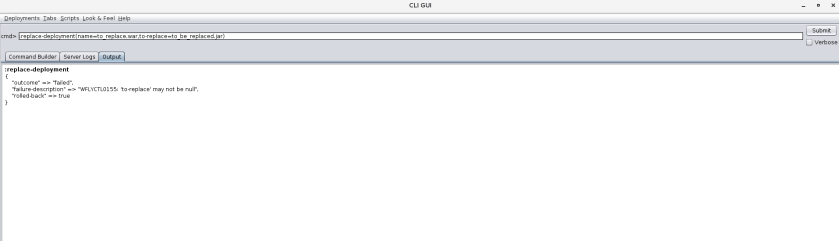
1. I prefer to do my deployment/replacements in JBoss using the /jboss-cli.sh script, which is in $JBOSS_HOME7.3/bin. Pretty straight forward:

:replace-deployment(name=to_replace.war,to-replace=to_be_replaced.jar)

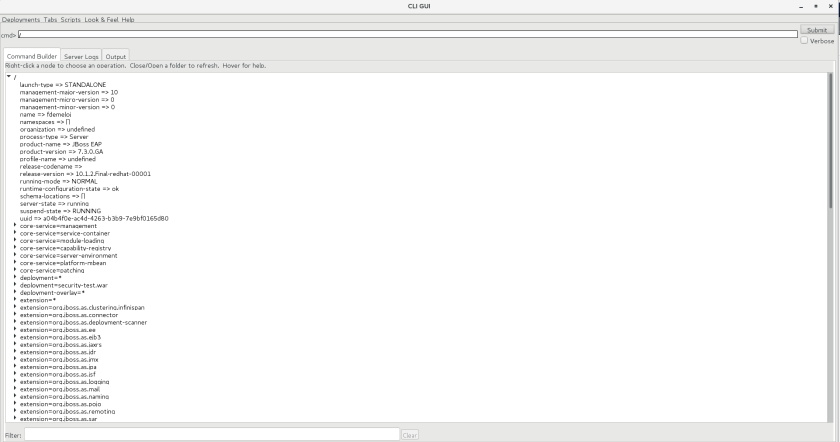
Some people do prefer a GUI, so just open the GUI using jboss-cli:

#./jboss-cli.sh –gui

The command will open the Cli – Gui:

cli_gui

You can personalize the view for showing a more coller view, my favourite is actually the <Nimbus>. The command you write write on the top at cmd> and to see the properties, double click on the list.

nimbus

Infinispan/JDG Quickstarts – CarMart

All

Intro

I will try to post a all the quick-starts here, with some comments/thoughts, basicall try to dissect some of the application for knowledge gain on infinispan/jdg-rhdg using the libraby mode in EAP.

Overview CarMart

This is an application to use Infinispan’s features (caches) instead of a DB per se, front-end on JSF, deployed as app on JBoss and infinispan cache.

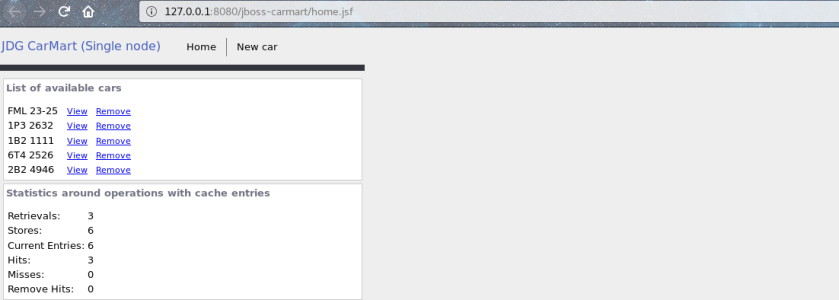
That’s the application deployed, we can see the list of cars and the cache statistics:
jdg

Retrivals means the number of get operations.

Deploying

First compile the application using Maven, the start eap and deploy.

19:12:24,702 INFO [org.jboss.as.server] (DeploymentScanner-threads – 1) WFLYSRV0010: Deployed “jboss-carmart.war” (runtime-name : “jboss-carmart.war”)

I added some external logs as well, to show getCacheContainer function:

INFO [com.ocpsoft.pretty.PrettyFilter] (default task-2) PrettyFilter initialized.
INFO [org.jboss.as.quickstarts.datagrid.carmart.session.LocalCacheContainerProvider] (default task-2) cool log

JSF

JSF2.0 plays a role here with a template, this is explained on using template  with `<ui:composition template`so the home.jsf imports the template file.

The exchange of information is done with the Remote using a javex annotation ​ @Named, to declare the bean `stats`, the form template is populated by an EL expression, which means it can also invoke the setter when submitting the form:

<h:outputLabel value=”Retrievals:” /><h:outputText value=”#{stats.retrievals}” />

That actually calls the getter function, on the LocalStatisticsProvider.java:

public String getRetrievals() {return stats.get(ServerStatistics.RETRIEVALS);}

The app has also css, which is imported using styleClass in file style.css.

CacheContainer

The core of the code, of course, is on the CacheContainerProvider interface, on this application we have the local container provider, that extends the cache container provider – the upper level class is an abstract class. On this example, it will be the LocalCacheContainerProvider, that’s the core with all the settings for the cache:

GlobalConfiguration glob = new GlobalConfigurationBuilder()
.nonClusteredDefault() //Helper method that gets you a default constructed GlobalConfiguration, preconfigured for use in LOCAL mode
.globalJmxStatistics().enable() //This method allows enables the jmx statistics of the global configuration.
.build(); //Builds the GlobalConfiguration object

Original configuration:

– jmx statistics

– clustering and local mode so the data is not replicated.

– isolation levels (from the 3 levels of isolation of dbs): REPEATABLE_READ.

The populate is done with a PopulateCache that manually creates each car.

INFO [org.jboss.as.quickstarts.datagrid.carmart.jsf.PopulateCache] (ServerService Thread Pool — 142) Successfully imported data!

Insertion

Creation of the basic cache:

BasicCache<String, Object> cars = provider.getCacheContainer().getCache(CarManager.CACHE_NAME);

The insertion is done using the cache provider (encoded):

cars.put(CarManager.encode(c.getNumberPlate()), c);

Addition of the new car follows the same pattern as populating the home.jsf – done with the annotation @Model, that creates a EL. So then get the cache with the cache name, and the put the value – encoding in UTF-8.

carCache = provider.getCacheContainer().getCache(CACHE_NAME);
carCache.put(CarManager.encode(car.getNumberPlate()), car);
List<String> carNumbers = getNumberPlateList();
if (carNumbers == null)
carNumbers = new LinkedList<String>();
carNumbers.add(car.getNumberPlate());
carCache.put(CAR_NUMBERS_KEY, carNumbers);
return “home”;

Statistics

As shown above, the statistics comes from a JMX connection and are enabled with `globalJmxStatistics().enable()`. The core operation is to get the cache from the cache manager (with name, since the cache architecture in JDG is based on naming):

stats = ((DefaultCacheManager) provider.getCacheContainer()).getCache(CarManager.CACHE_NAME).getAdvancedCache()
.getStats();

On this example, the cache name is defined globally as <CarManager.CACHE_NAME>. All those stats information are conteined in Stats class.

To display, the only process needed is to convert to string:

public String getMisses() { return String.valueOf(stats.getMisses());}

The Server Statistics meaning is on documentation

Interesting facts:

1. changing RemoteStatisticsProvider @Named(“stats”) does not break the application, but Local RemoteStatisticsProvider does: Reason you’re using local ofc.

2. Added a new car, on Populate Cache, but there is no plate verification, so the plate repeated: Reason: addition is an example.

6T4 2526
2B2 4946
2B2 4946

3. Added some more data on the stats table,  adding Time Since Beginning. Reason: there are more stats that can be added.

Retrievals: 3
Stores: 6
Current Entries: 6
Hits: 3
Misses: 0
Remove Hits: 0
Time Since Beginning 2

4. The Infinispan stores the references to the values so you are modifying directly the object – aka by reference.

5. The insertion encode is done for `​UTF-8`.

6. The added custom log message actually appears 3 times when deploying the application. Reason: not sure why.

7. Yes, the more you reload, the more the number of hits will increase, and the time since beginning as well. The time is in seconds.

8. After updating a few times, the browser crashed and continue to add more and more repeated data when I was refreshing the page. Maybe it was the cache lol!

cache

9. When deploying you will see an warning:

WARN [org.infinispan.manager.DefaultCacheManager] (ServerService Thread Pool — 120) ISPN000435: Cache manager initialized with a default cache configuration but without a name for it. Set it in the GlobalConfiguration.

This can be solved setting up a cache manager name or at least, it should:

.cacheManagerName(CACHE_NAME)

Conclusion

This is a good exercises that can make sense the introductory pages of Infinispan. There are many small concepts to learn on Infinispan, the only way to learn is a hands on approach.

The most important part of the tutorial, ofc, is the cache, but it has this hardcoded configuration so is obscure and requires some previous knowledge for understanding it.

Suggestion: new DefaultCacheManager("use-a-confi-file.xml");

Don’t forget the :.: on ClassPath

All

Intro: problem statement

For some reason, my ./add-user.sh user was not working on WildFly/JBoss EAP 7.3, so I couldn’t actually open the console page on http://localhost:8080/.

So decided to add the user directly, on $wildfly-19.0.0.Final/standalone/configuration
mgmt-users.properties.

mgmt-users.properties File

So the `mgmt-users.properties` will be encrypted and will look like:

         #admin=2a0923285184943425d1f53ddd58ec7a

This happens because the passwords are hashed using:

mechanism:HEX( MD5( username ‘:’ realm ‘:’ password))

Workaround

Found a blog post that implements this mechanism on How to generate the password on JBoss AS, by based directly on org.jboss.crypto.CryptoUtil lib hashing method:

  1. Did some small modification on the EncryptPassword.java file, that is actually broken for 1.8.191, removing some stuff.
  2. Exported the Env variable – CLASS_PATH
  3. compilated with javac (since was running in JDK 8, not 11 that has java directly)
  4. All fine, but forgot to add the <:.:> on the classpath export. So of course, java was not finding my class. As in:

$ export CLASSPATH=/jboss-client-4.0.2.jar://picketbox-5.1.0.Final.jar
$ /jdk1.8.0_191/bin/javac EncryptPassword.java
$ /jdk1.8.0_191/bin/java EncryptPassword testUserOne ApplicationRealm testPasswordOne
Error: Could not find or load main class EncryptPassword

5. Fix adding :.: so adding the current directory on the classpath:

$ export CLASSPATH=/jboss-client-4.0.2.jar:/picketbox-5.1.0.Final.jar:.:
$ /jdk1.8.0_191/bin/javac EncryptPassword.java
$ /jdk1.8.0_191/bin/java EncryptPassword testUserOne ApplicationRealm testPasswordOne
clearTextPassword: testUserOne:ApplicationRealm:testPasswordOne
hashedPassword: cf8f98f5b90ccc568e1ffc7767ac9d8b
If you will create user using add-user.sh script then you will see the same Hash Value of Password.nn

6. Edit directly the mgmt-users.properties with the user/hashedPassword values, and could access the management page.

#admin=2a0923285184943425d1f53ddd58ec7a
testUserOne=cf8f98f5b90ccc568e1ffc7767ac9d8b

Using this workaround, was able to access the console page directly.

C2 Compilation

All

Just-In-Time Java compilers: Client and Server

As described to the Hotspot Glossary

Highly optimizing bytecode compiler, also known as ‘opto’. Uses a “sea of nodes” SSA “ideal” IR, which lowers to a machine-specific IR of the same kind. Has a graph-coloring register allocator; colors all machine state, including local, global, and argument registers and stack. Optimizations include global value numbering, conditional constant type propagation, constant folding, global code motion, algebraic identities, method inlining (aggressive, optimistic, and/or multi-morphic), intrinsic replacement, loop transformations (unswitching, unrolling), array range check elimination.

With two compilers, plus interpreter.

To disable the C2 Compiler, you can use:

   -XX:TieredStopAtLevel=1.

(BTW, some people use TieredStopAtLevel=1 to limit the total time of optimization during compilation process, therefore reducing the overhead of the compiler and gain some speed) See [3]

Basically, this flag, disables intermediate compilation tiers (1, 2, 3), so that a method is either interpreted or compiled at the maximum optimization level (C2).

# $JAVA_HOME/bin/java -XX:+PrintFlagsFinal -version | grep CompileThreshold
intx CompileThreshold = 10000 {pd product}
uintx IncreaseFirstTierCompileThresholdAt = 50 {product}
intx Tier2CompileThreshold = 0 {product}
intx Tier3CompileThreshold = 2000 {product}
intx Tier4CompileThreshold = 15000 {product}
java version “1.8.0_191”
Java(TM) SE Runtime Environment (build 1.8.0_191-b12)
Java HotSpot(TM) 64-Bit Server VM (build 25.191-b12, mixed mode)

Issues

There are several issues that can happen, for example:

  1. A method get stuck on the C2 compilation

On this case, you will need to see which method is, using htop/top -H, then jstack -m or (pstack) and then see the line with C2Compiler::compile_method, so then you can use exclude the method of C2 using -XX:CompileCommand flag.

      2.CodeCache Full

On this case, the Code Cache is full, so you will need to increase the initial reserved space for code cache, and use codecache flushing, as below:

-XX:ReservedCodeCacheSize=384m
-XX:+UseCodeCacheFlushing

References

[1] https://phauer.com/2017/increase-jvm-development-productivity/