I recently found the original JGroups patent
All
Infinispan/JDG Quickstarts Pt5 – Java HotRod
AllIntro
Another Hot Rod tutorial, this time with java, similar concept but using a Hot Rod java client. Just a reminder, basically TCP client that access the cache on JDG.
Core part
There is the `FootballManager` and the Team, which are pretty much the classes that play a role here (except for the user). So then a FootballManager has team(s) and so forth. The team just encapsulates the list of players and the name. The core part (talking with the cache itself) is on the FootballManager class.
ConfigurationBuilder builder = new ConfigurationBuilder();
builder.addServer()
.host(jdgProperty(JDG_HOST))
.port(Integer.parseInt(jdgProperty(HOTROD_PORT)));
cacheManager = new RemoteCacheManager(builder.build());
cache = cacheManager.getCache(“teams”);
The main part is then the builder adding the server with jdgProperty (from a file) and the port. Then it adds the players. The file has basically the host and the port:
jdg.host=localhost
jdg.hotrod.port=11222
To read the commands, it is used java.io.Console in comparison with the javascript version (that uses Vorpalo=||==>).
Interesting Topics
– Originally the players added were Messi, Pedro, and Puyol. I changed for Pele, Tostao, and Rivelino (Tri-world champions on the1970th World Cup in Mexico)
– Comparing with the JS version: This version is done in Java,that’s the only difference. Although js has a simpler connection with JDG.
– Interestingly, java.io.Console reading is faster than bufferedReader
REFs
inline
Mocking request http
AllIntro
Recently I needed to simulate some requests http so then I used EasyMock. Quite useful indeed and very simple:
Code
HelloServletMock mock = new HelloServletMock();
HttpServletRequest request = createMock(HttpServletRequest.class);
HttpServletResponse response = createMock(HttpServletResponse.class);expect(request.getParameter(“yourName“)).andReturn(“Jose Carlos“).times(1, 2);
replay(request);
On this case the request will return “Jose Carlos” when I get the paramter “yourName”, example:
String yourName = request.getParameter(“yourName”);
Icedtea-web ~ jnlp launcher
AllIntro
As replacement for Java Web Start, IcedTea-web, provides a Java Web browser plugin. What I like about this project is that it is so clean, easy to access, easy to execute some Java Network Launch Protocol files.
Icedtea-web
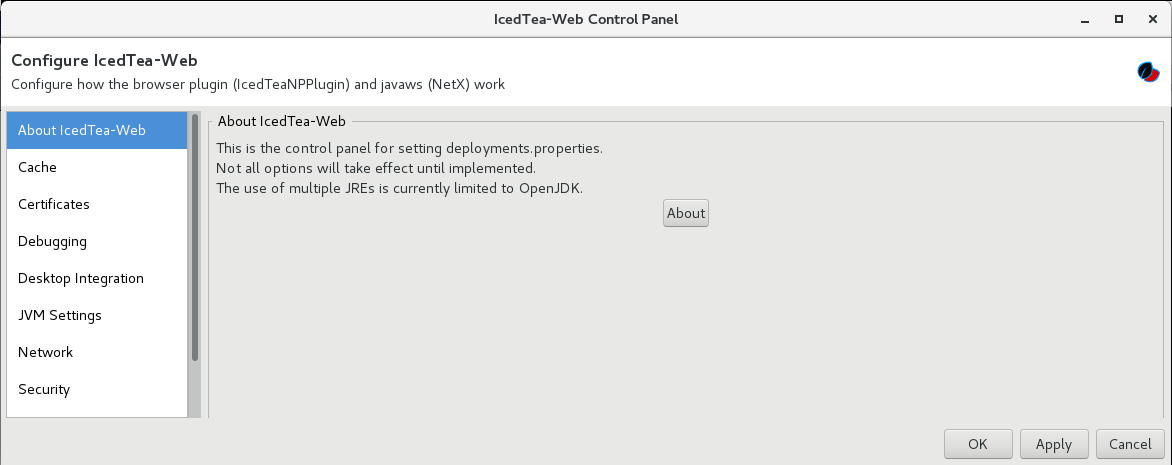
Control Panel

Iced Tea Web – Control Panel
JVM Settings
Using this setting will help to set the JVM properties.
Policy Settings
This basically is a link to the java.policy:
[$JAVA_HOME/jdk1.8.0_191]$ cd jre/lib/security/
[fdemeloj@fdemeloj security]$ ls
blacklist blacklisted.certs cacerts java.policy java.security javaws.policy policy trusted.libraries
Extended applet security
So here one can add the exceptions, in a similar way to JWS. So then you edit the rows in order to add the site exception.
IcedTea-Web Tests/Samples
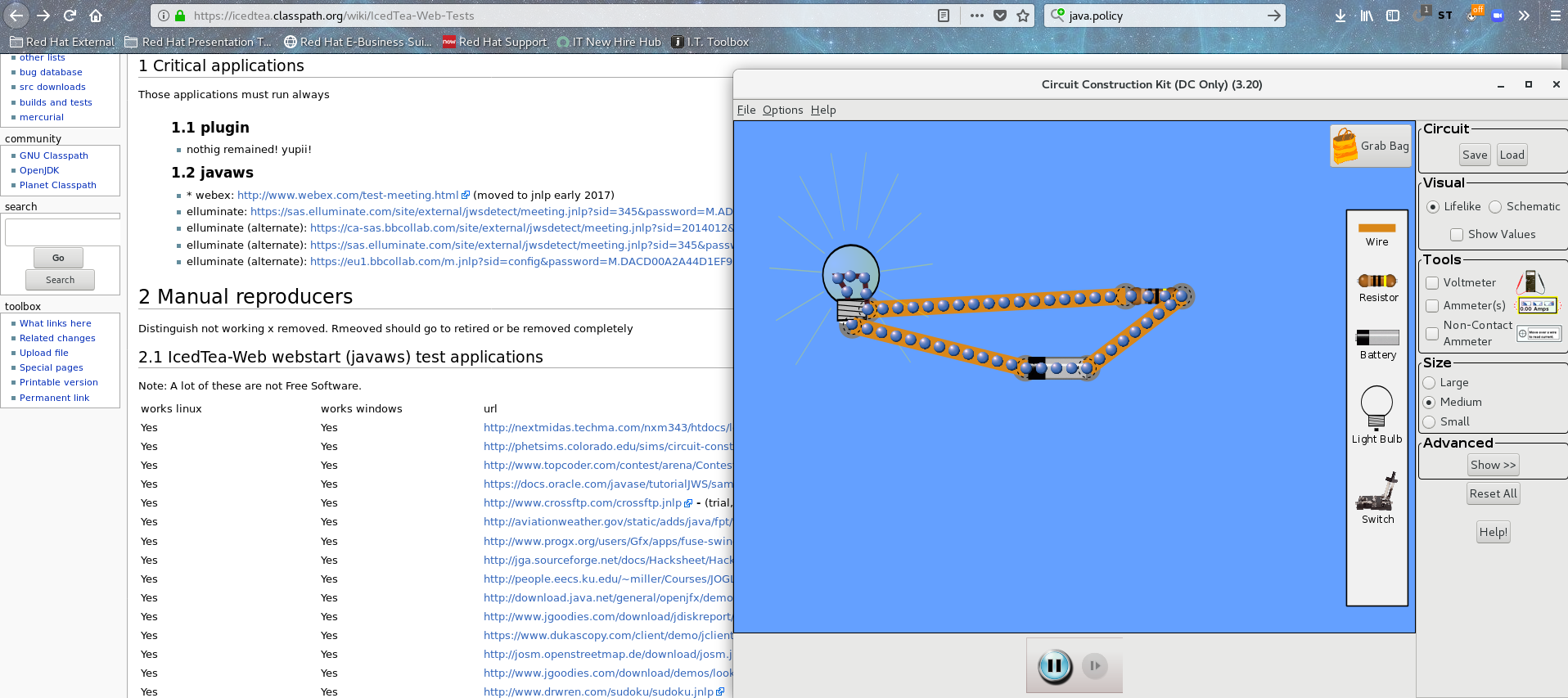
On the link you can select the test to be done, the tests are .jnlp files that you execute directly clicking on it (of course, the default will be IcedTea-web) so we open. This one is pretty cool: circuit-construction-kit-dc_en.jnlp – Developed by PhET at the University of Colorado.

IcedTea test – circuit construction
The code is pretty straightforward, is jnlp file:
You will have a XML file with:
1. code base link (to fetch),
2.a jar file (to execute),
3. some properties – language for example
<?xml version=”1.0″ encoding=”utf-8″?>
<!– JNLP File for Circuit Construction Kit (DC Only) –>
<jnlp spec=”1.0+” codebase=”https://phet.colorado.edu/sims/circuit-construction-kit” href=”circuit-construction-kit-dc_en.jnlp”>
<property name=”javaws.phet.locale” value=”en” />
<property name=”javaws.user.language” value=”en” /><jar href=”circuit-construction-kit_all.jar”/> ii
</resources>
<application-desc main-class=”edu.colorado.phet.circuitconstructionkit.CircuitConstructionKitDCApplication“>
</application-desc>
</jnlp>
- The main class to be executed is set with <application-desc main-class>
- Interestingly they have this application for several languages, including Korean and Portuguese! It is possible to change the language by changing the property <property name=”javaws.phet.locale” value=”LANGUAGE” /> AND the doc circuit-construction-kit-dc_es.jnlp. And yes, Ampolleta means light in Spanish.
The tags and meaning of them can be found in JNLP Syntax
REFs
inline
OOB messages
AllIntro
I’m using this new block scheme in Word Press, and I can say: I suck on this. Like totally, I don’t know where do to anything. Totally, is like learning a new language, I know nothing about it. But does not seem that bad, in fact.
OOB Messages
Out Of Band messages – are sent periodically from the members. Is a message with a tag Message.OOB and is processed by a specific thread pool: out-of-band thread pool at the receiver’s side and they are handled at the transport level.
Message msg=new Message();
msg.setFlag(Message.OOB, Message.NO_FC);
Configuration of the oob thread pool:
oob_thread_pool.enabled="true"
oob_thread_pool.min_threads="1"
oob_thread_pool.max_threads="3"
oob_thread_pool.keep_alive_time="60000"
oob_thread_pool.queue_enabled="false"
oob_thread_pool.queue_max_size="500"
oob_thread_pool.rejection_policy="run"/>
getOOBThreadPool
public Executor getOOBThreadPool()
setOOBThreadPool
public void setOOBThreadPool(Executor oob_thread_pool)
Removing OOB Thread Pool
For simplicity, JGroups ended up removing OOB Thread Pool, which was combined with the regular thread pool, reducing the number of thread pools in JGroups 4. This means the configuration above, for oob thread pool, becomes obsolete and the new configuration is done as follows:
thread_pool.enabled="true"
thread_pool.min_threads="2"
thread_pool.max_threads="8"
thread_pool.keep_alive_time="5000"
REFs
inline
Quick servlet
AllIntro
Gonna show how to do a small servlet here.
Writing
Basically the main part is to extend HttpsServlet
public class StarterServlet extends HttpServlet {
private static final long serialVersionUID = 1L;
@Override
public void init(ServletConfig servletConfiguration) throws ServletException {super.init(servletConfiguration);
System.out.println(“SERVLET STARTED!”);
}@Override
protected void doGet(HttpServletRequest request, HttpServletResponse response) throws ServletException, IOException {System.out.println(“DOGET!”);
PrintWriter printWriter = response.getWriter();
printWriter.println(“Hello world”);
}
}
Creating the war file
jar -cvf myapp.war *
Deploying
cp myapp.war /home/fdemeloj/jboss-eap-7.3/standalone/deployments
Accessing it
Linkedin Social Selling Index
AllHeads up
Linkedin has an index of social influence, is called SSI. Basically is how much you impact your social network – SSI. Although I usually don’t care much about index in social media, this one might be relevant since it is related to work career.
How is calculated
Basically is a sum of the 4 items:
-
Establish your professional brand (1-25)
-
Find the right people (1-25)
-
Engage with insights (1-25)
-
Build relationships (1-25)
How to improve your Social Selling Index:
There is a presentation about this directly from Linkedin.
REFs
https://www.linkedin.com/sales/ssi
Wildfly-config file
AllIntro
During the process of discovery a client requires access to its configuration, the classpath is scanned for and the first thing is to look at Wildfly file or can be set with a system-configuration as well – which will load several properties.
In EJB replaces jboss-ejb-client.properties file which is configured for EJB standalone client applications.
Wildfly-config file
There are several usages for wildfly-config but authentication is one of them:
<?xml version="1.0" encoding="UTF-8"?> <configuration> <authentication-client xmlns="urn:elytron:1.0"> ... </authentication-client> </configuration>
More information can find here
Replacing: jboss-ejb-client.properties::
Using this can be helpful to set several properties, invocation-timeouts and can be used to add connections, which is used to specify an EJB client connection but also can add an interceptors element – I will post about interceptors on this year.
Demo
Basically, getting the EJB-security you will see the following architecture after the compilation:
[ejb-security]$ tree
.
├── src
│ └── main
│ ├── java
│ │ └── org
│ │ └── jboss
│ │ └── as
│ │ └── quickstarts
│ │ └── ejb_security
│ │ ├── RemoteClient.java <----- the client
│ │ ├── SecuredEJB.java <--- EJB
│ │ └── SecuredEJBRemote.java <--- EJB
│ └── resources
│ └── wildfly-config.xml <---- wildlfly-config.xml
└── target <--- yes, mvn clean install has passed here
├── checkstyle-cachefile
├── checkstyle-checker.xml
├── checkstyle-header.txt
├── checkstyle-result.xml
├── classes
│ ├── META-INF
│ │ └── build.metadata
│ ├── org
│ │ └── jboss
│ │ └── as
│ │ └── quickstarts
│ │ └── ejb_security
│ │ ├── RemoteClient.class
│ │ ├── SecuredEJB.class
│ │ └── SecuredEJBRemote.class
│ └── wildfly-config.xml <---- on the target you will see the wildfly-config.xml file
28 directories, 28 files
Running the example should be trivial (after adding the quickstartUser in the application-users.properties), and the result should be:
$ mvn exec:exec -X
Successfully called secured bean, caller principal quickstartUser
Principal has admin permission: true #if quickstartUser=guest, admin
OR
Principal has admin permission: false #if quickstartUser=guest
Issues
1. EJBCLIENT000409: No more destinations are available
Exception in thread "main" org.jboss.ejb.client.RequestSendFailedException: EJBCLIENT000409: No more destinations are available
at org.jboss.ejb.client.EJBClientInvocationContext.getResult(EJBClientInvocationContext.java:592) <--- EJB client invocation context, which will call the EJB invocation
....
at org.jboss.as.quickstarts.ejb_security.RemoteClient.main(RemoteClient.java:45)
Suppressed: org.jboss.ejb.client.RequestSendFailedException
at org.jboss.ejb.protocol.remote.RemoteEJBReceiver$1.handleFailed(RemoteEJBReceiver.java:101)
at org.jboss.ejb.protocol.remote.RemoteEJBReceiver$1.handleFailed(RemoteEJBReceiver.java:74)
at org.xnio.IoFuture$HandlingNotifier.notify(IoFuture.java:215)
at org.xnio.AbstractIoFuture$NotifierRunnable.run(AbstractIoFuture.java:720)
at org.jboss.remoting3.EndpointImpl$TrackingExecutor.lambda$execute$0(EndpointImpl.java:949)
at org.jboss.threads.ContextClassLoaderSavingRunnable.run(ContextClassLoaderSavingRunnable.java:35)
at org.jboss.threads.EnhancedQueueExecutor.safeRun(EnhancedQueueExecutor.java:1985)
at org.jboss.threads.EnhancedQueueExecutor$ThreadBody.doRunTask(EnhancedQueueExecutor.java:1487)
at org.jboss.threads.EnhancedQueueExecutor$ThreadBody.run(EnhancedQueueExecutor.java:1378)
at java.lang.Thread.run(Thread.java:748)
Caused by: javax.security.sasl.SaslException: Authentication failed: all available authentication mechanisms failed:
DIGEST-MD5: javax.security.sasl.SaslException: DIGEST-MD5: Server rejected authentication <---- Rejected Authentication
2. Port is wrong:
Start jboss with port offset: $ ./bin/standalone.sh -Djboss.socket.binding.port-offset=100:
00:19:50,385 INFO [org.wildfly.extension.undertow] (MSC service thread 1-7) WFLYUT0006: Undertow HTTP listener default listening on 127.0.0.1:8180 <-- 8180
Using a wildfly-config.xml:
<jboss-ejb-client xmlns="urn:jboss:wildfly-client-ejb:3.0">
<connections>
<connection uri="remote+http://localhost:8080"/>
</connections>
</jboss-ejb-client>
So then since the ports are different, a NoSuchEJBException appears:
Exception in thread "main" javax.ejb.NoSuchEJBException: EJBCLIENT000079: Unable to discover destination for request for EJB StatelessEJBLocator for "/ejb-security/SecuredEJB", view is interface org.jboss.as.quickstarts.ejb_security.SecuredEJBRemote, affinity is None
at org.jboss.ejb.client.EJBClientInvocationContext.getResult(EJBClientInvocationContext.java:592)
at org.jboss.ejb.client.EJBClientInvocationContext.getResult(EJBClientInvocationContext.java:528)
....
at com.sun.proxy.$Proxy0.getSecurityInfo(Unknown Source)
at org.jboss.as.quickstarts.ejb_security.RemoteClient.main(RemoteClient.java:45)
Suppressed: java.net.ConnectException: Connection refused <----- expected
at sun.nio.ch.SocketChannelImpl.checkConnect(Native Method)
Fixing 8180 on the wildfly-config.xml, so then we have:
Nov 07, 2019 12:23:40 AM org.jboss.remoting3.EndpointImpl
INFO: JBoss Remoting version 5.0.8.Final-redhat-1
Successfully called secured bean, caller principal quickstartUser
REFs
inline.
I wrote this post listening to Harry Styles (British singer), and it one of the best songs of the album Fine Line (2019), his second album. Yes, same HS that was in One Direction. That’s the only thing I’ll ever do.
String Theory and M-Theory
AllJGroups – pt 2 ~ Protocols review
AllContinuing on JGroups
Message
[destination][headers] [payload]
Protocols
The protocols always are from the org.jgroups.protocolshot
<config xmlns="urn:org:jgroups"
xmlns:xsi="http://www.w3.org/2001/XMLSchema-instance"
xsi:schemaLocation="urn:org:jgroups http://www.jgroups.org/schema/jgroups.xsd">
<UDP
mcast_port="${jgroups.udp.mcast_port:45588}"
ip_ttl="4"
max_bundle_size="64K"
enable_diagnostics="true"
thread_pool.min_threads="2"
thread_pool.max_threads="8"
thread_pool.keep_alive_time="5000" />
<PING />
<MERGE3 max_interval="30000" min_interval="10000"/>
<FD_SOCK/>
<FD_ALL/>
<VERIFY_SUSPECT timeout="1500" />
<pbcast.NAKACK2 xmit_interval="500" />
<UNICAST3 xmit_interval="500" />
<pbcast.STABLE desired_avg_gossip="50000"
max_bytes="4M"/>
<pbcast.GMS print_local_addr="true" join_timeout="2000"/>
<UFC max_credits="2M"
min_threshold="0.4"/>
<MFC max_credits="2M"
min_threshold="0.4"/>
<FRAG2 frag_size="60K" />
</config>
UDP
mcast_port specifies the multicast port number. If omitted, the default is 45566
ip_ttl: time to live IP Multicast packets
PING
MERGE3
This service enables the node coordinators in partitions to put the cluster back again in case of failure and form a single cluster back again.
FD SOCK
Fail detection protocol based on sockets.
FD ALL
Failure detection protocol based on simple heartbeat protocol.
VERIFY_SUSPECT
pbcast.NAKACK2
Reliable delivery protocol: NAKACK protocol is used for multicast messages, which are numbered in a sequence. In case the receiver misses one message, he can ask to re-transmit it.
UNICAST3
Reliable delivery protocol: Unicast is not necessary in case of TCP.
pbcast.STABLE
Is responsible to calculate the stable messages (the ones delivered by members), then send <STABLE> events so then the GC can act (with the NAKACK) – the GC applies on the messages we are accumulating – regulated either by the <> or <>
• desired_avg_gossipspecifies intervals (in milliseconds) of garbage collection• max_bytesspecifies the maximum number of bytes received before the cluster
pbcast.GMS
Group membership protocol. Handles joins/leaves/crashes (suspicions) and emits new views accordingly.
UFC
Unified Flow Control protocol based on credit system in which sender has a limited amount implemented using protected java.util.Map<Address,FlowControl.Credit>
MFC
Another Flow Control protocol based on credit system in which sender has a limited amount but implemented using protected CreditMap
FRAG2
This protocol will fragment a message, on this case any that is larger than <60K>
Reading the Protocols
The reading is from top to down so the stack will be built from UDP to FRAG2 protocols (bottom up) and each protocol is implemented a independent Java class.
Complete list
-
- java.lang.Object
- org.jgroups.stack.Protocol
- java.lang.Object
-
-
- Direct Known Subclasses:
AUTH,BARRIER,CLEAR_FLAGS,COMPRESS,COUNTER,DAISYCHAIN,DELAY,DELIVERY_TIME,DISCARD,DISCARD_PAYLOAD,Discovery,DROP,DUPL,Encrypt,EXAMPLE,FailureDetection,FD,FD_HOST,FD_SOCK,FlowControl,FLUSH,FORK,ForkProtocol,FORWARD_TO_COORD,FRAG,FRAG2,FRAG3,GMS,HDRS,INJECT_VIEW,KeyExchange,Locking,MAKE_BATCH,MERGE3,NAKACK2,NAMING,PDC,PERF,ProtocolStack,RATE_LIMITER,RELAY,RELAY2,REVERSE,RSVP,SEQUENCER,SEQUENCER2,SERIALIZE,SHUFFLE,SIZE,SNIFF,STABLE,STATE_TRANSFER,STATS,STOMP,StreamingStateTransfer,TOA,TP,TRACE,UNICAST3,VERIFY_SUSPECT
-
REFs
Although very outdated, this guide comes in hand to understand it.