Glassfish is pretty easy to change the log level directly on the console.
0. Open console adm: http://localhost:4848/common/index.jsf
1. Configuration
2. Logger Settings
3. Log Levels
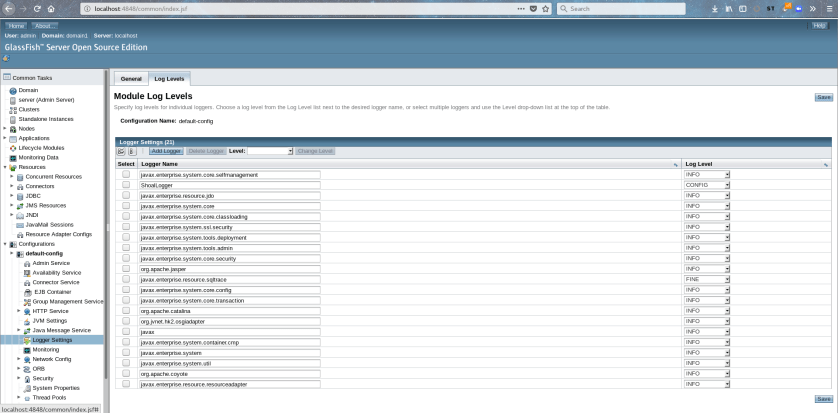

Glassfish is pretty easy to change the log level directly on the console.
0. Open console adm: http://localhost:4848/common/index.jsf
1. Configuration
2. Logger Settings
3. Log Levels
I thought I had already had written this blog post long ago. I might be mistaken, maybe when I wrote about the fact there is no more Jhat after OpenJDK 9, or talking about jVisualVM.
Well, I will miss it.
‘jhat’ is a heap analysis tool that parses a Java heap dump and enables web-browsing a parsed heap dump, and even write Object Query Language interface [1]
Pretty straight forward, the help is below only with the options I actually use:
Usage: jhat [-stack <bool>] [-refs <bool>] [-port <port>] [-baseline <file>] [-debug <int>] [-version] [-h|-help] <file>
-J<flag> Pass <flag> directly to the runtime system. For
example, -J-mx512m to use a maximum heap size of 512MB-port <port>: Set the port for the HTTP server. Defaults to 7000
-baseline <file>: Specify a baseline object dump. Objects in
both heap dumps with the same ID and same class will
be marked as not being “new”.-debug <int>: Set debug level.
0: No debug output
1: Debug hprof file parsing
2: Debug hprof file parsing, no server
-version Report version number-h|-help Print this help and exit
<file> The file to read
$JDK/bin/jhat -J-Xmx3g -port 7001 example.hprofReading from java_pid30212.hprof…
Dump file created Thu Feb 27 05:32:01 EST 2020
Snapshot read, resolving…
Resolving 15958718 objects…
Chasing references, expect 3191 dots…………………………………………………………………………………………………………………………………………………………………………………………………………………………………………………………………………………………………………………………………………………………………………………………………………………………………………………………………………………………………………………………………………………………………………………………………………………………………………………………………………………………………………………………………………………………………………………………………………………………………………………………………………………………………………………………………………………………………………………………………………………………………………………………………………………………………………………………………………………………………………………………………………………………………………………………………………………………………………………………………………………………………………………………………………………………………………………………………………………………………………………………………………………………………………………………………………………………………………………………………………………………………………………………………………………………………………………………………………………………………………………………………………………………………………………………………………………………………………………………………………………………………………………………………………………………………………………………………………………………………………………………………………………………………………………………………………………………………………………………………………………………………………………………………………………………………………………………………………………………………………………………………………………………………………………………………………………………………………………………………………………………………………………………………………………………………………………………………………………………………………………………………………………………………………………………………………………..
Eliminating duplicate references…………………………………………………………………………………………………………………………………………………………………………………………………………………………………………………………………………………………………………………………………………………………………………………………………………………………………………………………………………………………………………………………………………………………………………………………………………………………………………………………………………………………………………………………………………………………………………………………………………………………………………………………………………………………………………………………………………………………………………………………………………………………………………………………………………………………………………………………………………………………………………………………………………………………………………………………………………………………………………………………………………………………………………………………………………………………………………………………………………………………………………………………………………………………………………………………………………………………………………………………………………………………………………………………………………………………………………………………………………………………………………………………………………………………………………………………………………………………………………………………………………………………………………………………………………………………………………………………………………………………………………………………………………………………………………………………………………………………………………………………………………………………………………………………………………………………………………………………………………………………………………………………………………………………………………………………………………………………………………………………………………………………………………………………………………………………………………………………………………………………………………………………………………………………………………………………………………………..
Snapshot resolved.
Started HTTP server on port 7001
Server is ready.
This tells the jhat will use 3g will affect the effect of the heap size of JVM. In this case, I do not use the parameter file, but rather, pass the file directly at the end.
-f= file.hprof
3. Open the browser with port 7001 on this case, specified with -port 7001.
4. Do the OQL queries, example ~ to investigate native memory leak:
SELECT k, k.capacity FROM java.nio.DirectByteBuffer k
Example with MAT for Query:

All Classes (excluding platform)
Package <Arrays>
(…)
(…)
5. See ~ which is quite useful to count objects:
Execute Object Query Language (OQL) query
Select * from org.hornetq.core.client.impl.ServerLocatorImpl o WHERE o.initialConnectors != null
You can use this OQL or the class would be on jhat console directly.
[1] https://www.infoq.com/news/2015/12/OpenJDK-9-removal-of-HPROF-jhat/
[2] This book covers a little bit of the tool and has several OQL queries for guidance.
The useful tool JDeps can be used to analyze dependencies on JDK 11, it can even show dependencies of SQL.
[fdemeloj@fdemeloj cases]$ /home/fdemeloj/Downloads/jdk-11.0.1/bin/jdeps GFG.class
GFG.class -> java.base
<unnamed> -> java.io java.base
<unnamed> -> java.lang java.base
The option -v, verbose, show more details:
[fdemeloj@fdemeloj cases]$ /home/fdemeloj/Downloads/jdk-11.0.1/bin/jdeps -v GFG.class
GFG.class -> java.base
GFG -> java.io.PrintStream java.base
GFG -> java.lang.Object java.base
GFG -> java.lang.String java.base
GFG -> java.lang.System java.base
Brushing up my python skills since it’s been a while.
The problem:
You have two lists. The first list are the keywords. The seconds contains the sentences that those keywords are used. You just need to return the top (n) of the used keywords:
Example:
#Main function:def popularNFeatures(numFeatures, topFeatures, possibleFeatures, numFeatureRequests, featureRequests, print_flag = False):
word_counts = Counter(featureRequests)print word_countshistogram = {}#Counter({‘hello’: 2, ‘ciao’: 1, ‘hi’: 1})word_counts[eachFeature]sorted_d = sorted(word_counts.items(), key=operator.itemgetter(1),reverse = True)#[(‘hello’, 2), (‘ciao’, 1), (‘hi’, 1)]return [item[0] for idx,item in enumerate(sorted_d) if idx < topFeatures]
for eachFeature in possibleFeatures:value = endstring.count(eachFeature)aux = module_node.node(eachFeature, value)list_nodes.append(aux)
def insert(self, new_node, print_flag=False):#The list is emptyif print_flag:new_node.printNode()iflen(self.list_nodes) == 0:self.list_nodes.append(new_node)returnTrueiflen(self.list_nodes) > 0:max = self.list_nodes[0].get_value()min = self.list_nodes[-1].get_value()#print “max” + str(max)+ “min” + str(min)if new_node.get_value() >= max:new_list = []new_list.append(new_node)new_list.extend(self.list_nodes)self.list_nodes = new_listif new_node.get_value() <= min:self.list_nodes.append(new_node)if new_node.get_value() > minand new_node.get_value() < max:new_list = []for node inself.list_nodes:if node.get_value() <= new_node.get_value():new_list.append(new_node)new_list.append(node)self.list_nodes = new_list
Sometimes JConsole is not enough to investigate issues, such as performance-related ones.
Java Mission Control is available for OpenJDK, and Oracle JDK, Oracle has a good introduction for those tools here. Basically, Misson control is the tool for troubleshooting, and Flight Recorder is the API ~ according to JEPS 328.
Oracle guide to understanding data
Beginning
Using JMC
1. Use case 1:: Analyzing data with Missiong control
1. Use case 2:: JMX to JBoss (like I did with JVisualVM)
Problem statement
A virus is spreading. It spreads one in all directions. Every hour, it spreads one space in all directions. Given the grid, how many hours it takes it to contaminate the whole grid?
So if you have a grid-like this:
0 0 0 0 1
0 0 0 0 0
0 0 0 0 0
0 0 0 0 0
In one hour it will be like this
0 0 0 1 1
0 0 0 0 1
0 0 0 0 0
0 0 0 0 0
Taking into consideration that the virus can appear anywhere in a grid, which has dimensions that are given by rows x columns, and the grid, which contains the initial virus locals. The virus cell is represented as 1 whereas, normal cells are 0 on the grid.
Resolution
I thought about this problem in two ways: one is procedural, the second is the virus as a living being.
1 – Procedural implementation:
So, you go line by line, get the positions of the virus, and calculate the four next positions ~ validate the positions and change from 0 to 1. In a loop. And continue doing that until all the 0 become 1’s
while(still_zero(grid)):print_grid(grid)list_ones = find_ones(grid, rows, columns)update_nearby(list_ones, grid, rows, columns)hours = hours + 1return hours
2 – Node implementation
The virus is actually a node, that grows in four dimensions (so the node knows where it will grow). So, if you have a mechanism to control those nodes, that control this growth. I called a tree but is much more like a linked list of nodes, that know where they will grow.
It will continue to spread while the grid still has 0’s, which is done on the growth process:
while(tree.still_can_grow()):aux.print_grid(grid)hours = hours + 1return hours
Implementation
For the procedural implementation, it is here
The tree implementation is here
Benchmarks
I’m doing some benchmarks on this to see the performance.
By default, a JSP page uses an area of memory known as a page buffer which is set as 8 KB by default, see ref.
And it is required if the page uses dynamic globalization support content type settings, forwards, or error pages.
You can ad in the page directive the attribute “buffer” like this to change this buffer:
~~~
<%@ page buffer="64kb" ... %>
~~~
And actually, you can disable it with using:
~~~
<%@ page buffer="none" %>
~~~
A deployment descriptor is a file that basically configures the artifacts that will be deployed, it is within the WEB-INF directory
Deployment descriptor in apache tomcat:
application/WEB-INF/context.xml
Deployment descriptors in EAP
jboss-web.xml and web.xml
Deployment descriptor Glassfish
sun-web.xml
Properties
Those files can be used to change properties on the application when deploying, for example, cookies configuration.
Some weeks ago we finally got the Canadian PR (ie. me, my partner is already Canadian Citizen).
Well, I can only say finally because it has been almost 7 years since I moved to Nova Scotia, then Quebec, and most recently Ontario.
Although I love Quebec, I would strongly recommend applying directly to the Express Entry Program, instead of the PEQ/Quebec PR process.
I also think it’s funny that when you are married to a Canadian citizen, you certainly don’t get the Citizenship, but not even the PR! hahaha! I mean, after living together with a person for certain years, not even PR!
I will be getting the Canadian Citizenship in about 2 years or less.
From this page and this question on StackOverFlow

Add the following commands on the app:
~~~
-Dcom.sun.management.jmxremote.port=9005
-Dcom.sun.management.jmxremote.authenticate=false
-Dcom.sun.management.jmxremote.ssl=false
~~~

~~~
jconsole -J-Djava.util.logging.config.file=path_to_logging.properties_for_jconsole
~~~

or you can use

~~~
[fdemeloj@fdemeloj bin]$ ./jconsole -debug
~~~

========================================================
logging.properties
========================================================
Logging.properties

handlers = java.util.logging.ConsoleHandler


.level = INFO

java.util.logging.ConsoleHandler.level = FINEST

java.util.logging.ConsoleHandler.formatter = \

java.util.logging.SimpleFormatter

// Use FINER or FINEST for javax.management.remote.level - FINEST is

// very verbose...

javax.management.level = FINEST

javax.management.remote.level = FINER
~~~

